
WordPress Translation Plugin Mystery:
Duplicate Elements Explained

- Written by Mila Skriptunova onJuly 16, 2026
“I write to share practical lessons from real web development projects, from frontend architecture and responsive design.”
The toughest bugs aren’t always broken code:
sometimes it works exactly as designed, just not as expected.
While testing a multilingual site on mobile, I noticed something odd:
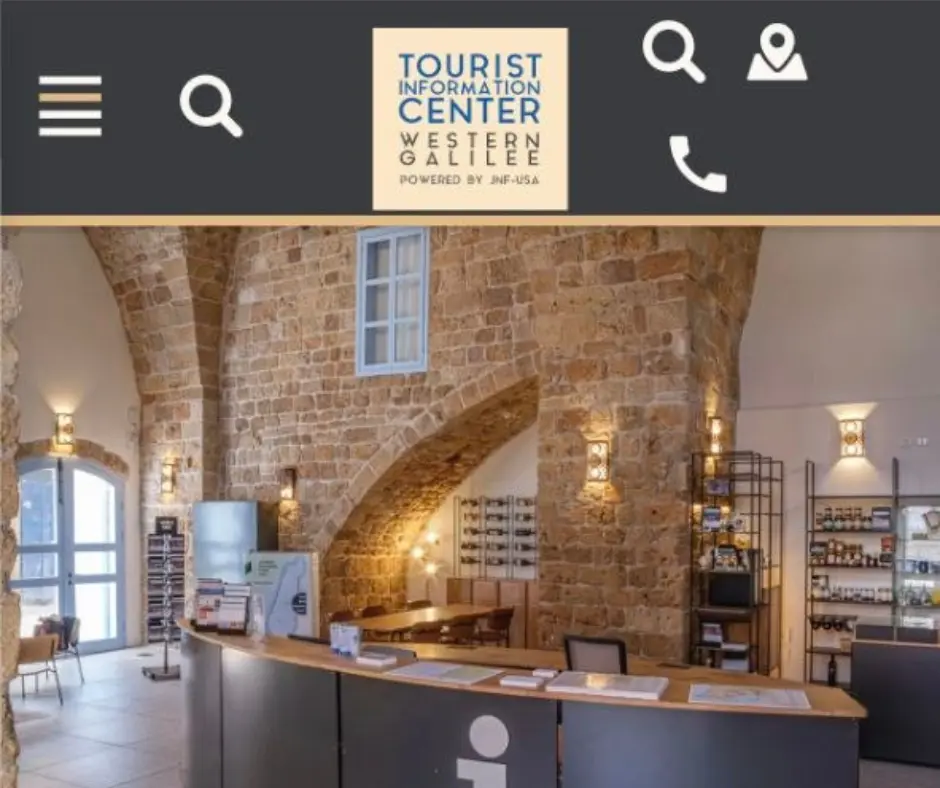
👉 switching to English made the search icon appear twice in the header.
At first, it looked like a simple frontend glitch. The real cause wasn’t.
📱 The Problem: Duplicates Search Icons on Mobile
The site worked perfectly in its original language.
But after switching to English, the mobile header suddenly showed duplicate search icons in WordPress: one near the hamburger menu and another next to the navigation and phone icons.
Same SVG. Same classes. Same behavior.
It looked like a single element had somehow been duplicated.
🔍 The First Approach: Looking for a CSS Problem
The first step was checking the usual suspects:
- CSS selectors
- duplicate menu items
- JavaScript manipulation
- hidden responsive elements
When debugging frontend issues, it is important to inspect what the browser actually receives, not what we expect to see in the editor.
Tools like Chrome DevTools help reveal the real DOM structure and applied styles.
👉 Official reference:
Chrome DevTools Documentation
I tested common solutions such as:
.element:nth-child(2) {
display:none;
}
and JavaScript approaches to remove the second search icon dynamically.
But the results were confusing:
- sometimes the wrong icon disappeared
- sometimes both icons disappeared
- JavaScript caused visible flickering because the browser rendered the element first and removed it afterward
This was a good reminder that frontend problems are often connected to deeper architecture issues.
For example, performance problems and unexpected behavior often come from hidden technical layers, similar to the issues discussed in my article:
🧩 Inspecting the DOM: The Real Discovery
The next step was inspecting the actual HTML structure.
And this is where things became interesting.
The search icon was not duplicated inside the same menu.
Instead, there were two different menu containers.
The structure looked like this:
Mobile Header
├── Menu Block A
│ └── Search Icon
│
└── Menu Block B
├── Search Icon
├── Navigation Icon
└── Phone Icon
The two search icons had almost identical HTML:
- same classes
- same SVG reference
- same behavior
That was why it was so easy to assume it was the same element.
It wasn’t.
It was two separate instances.
⚠️ The Hidden Cause: A Custom Translation Plugin
- the original menu remained
- another menu structure appeared
- both contained the search icon
🌍 Why Did It Only Happen in English?
The original language version did not trigger the same behavior.
The issue appeared only after switching languages because that activated the custom translation logic.
Multilingual websites often introduce another layer of complexity:
- translated content
- duplicated templates
- language-specific scripts
- conditional rendering
WordPress developers can learn more about internationalization concepts here:
🛠️ The Final Solution
Instead of trying to remove “the second icon” using position-based selectors, the better approach was identifying the unique container.
The unwanted search icon was inside the menu that also contained navigation elements.
The final CSS targeted only that specific structure:
.main-menu:has(.icon-type-svg-navigate)
li.icon-type-svg-search {
display: none;
}
The solution used the CSS :has() relational pseudo-class, which allows selecting an element based on its descendants.
More information:
The result:
✅ The correct search icon remained
✅ The duplicate disappeared
✅ No JavaScript was needed
✅ No loading flicker
🧠 What This Case Teaches Us
When you see a duplicated element on a website, don’t immediately assume it is a CSS issue.
1. Is it really the same element?
Sometimes two elements look identical but come from completely different parts of the DOM.
2. Is a plugin modifying the page structure?
Translation plugins, optimization plugins, and custom scripts can create unexpected duplicates.
3. Are you fixing the symptom or the cause?
Removing an element with JavaScript may hide the problem temporarily, but understanding why it exists leads to a cleaner solution.
This debugging approach is also important when optimizing websites. A good example is my WooCommerce performance investigation:
🚀 Final Thoughts
Modern websites are built from many layers:
- WordPress themes
- page builders
- custom code
- multilingual systems
- optimization tools
When something strange happens, the answer is often hidden somewhere between these layers.
The best debugging tool is still the same:
Inspect first. Assume nothing.
Because sometimes the biggest mystery is not:
“Why is this element broken?”
but:
“Why does this element exist twice?”
Struggling with unexpected bugs
on your WordPress site?
Let’s fix it together