
WooCommerce Admin Performance Fix
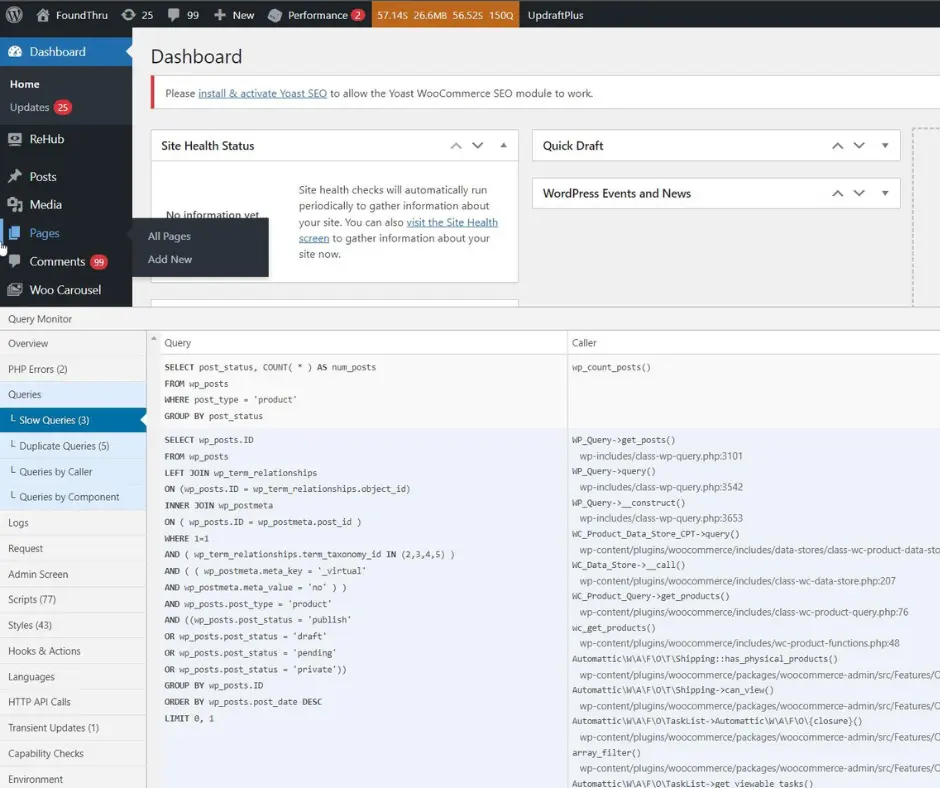
When your WordPress admin dashboard takes 20+ seconds to load every time you click a page, your workflow doesn’t just slow down, it grinds to a painful halt.
Recently, I had to fix this exact nightmare on a high-performance WooCommerce project. Instead of guessing or throwing money at a more expensive hosting plan, I rolled up my sleeves and audited the backend. 🛠️
Here is the exact step-by-step technical teardown of how I hunted down the “silent killers” of performance and brought the dashboard back to instant responsiveness.
Step 1: Taking Control of the Server & Taming WP-Cron ⚙️
First, I checked the hosting server resource usage metrics in cPanel. The account’s CPU usage was redlining at 119%. 🚨
The main culprit? WordPress’s default virtual cron system (WP-Cron). By default, WordPress triggers background tasks (checking updates, sending emails, syncing inventory) every single time a user or admin clicks around the site.
👉 Related reading: Why Your WordPress Site Is Slow and How to Fix It
The Fix:
I added a hard block to
wp-config.phpto prevent the site from running heavy background tasks on user clicks:
</> PHP
define( ‘DISABLE_WP_CRON’, true );
I replaced it with a real, asynchronous system cron job directly in cPanel, scheduled at an optimal 5-minute interval:
</> Bash
cd /home/user/public_html && /usr/local/bin/php /home/user/public_html/wp-cron.php
The Result: Background automation was offloaded entirely to the server level, completely out of the way of the admin experience. The hosting CPU load immediately plummeted from a critical 119% to a healthy 26%. 📉
Step 2: Optimizing the WooCommerce & Square Sync 🔄
This store relies heavily on a live integration with Square to keep its inventory accurate. However, making API calls to external servers over and over can cause massive performance bottlenecks if things get backed up.
👉 Related reading: How to Increase WordPress Memory Limit to Improve Site Speed
To fix this, I fine-tuned the plugin settings:
- I bumped the inventory sync interval to a stable 6 hours.
- I disabled the redundant two-way order completion sync (Order Fulfillment Sync).
This drastically cleaned up the constant background noise and API overhead.
Even though the server’s CPU was now cool and relaxed, the Pages list in the admin dashboard was still dragging its feet. I fired up Query Monitor to analyze the Slow Queries log.
👉 Related reading: Why Website Is Not Getting Clients (Even If It Looks Professional)
Bingo. 🎯 A heavy UPDATE query to the wp_options table was getting trapped in a deadlock:
Step 3: Catching Database Deadlocks with Query Monitor 🔍
WHERE option_name = ‘html-regression-track-admin-assets’
The Culprit: Independent Analytics Pro. On every single page load, this plugin was trying to compile the scripts and styles of every active system on the site (Elementor, Astra, Rank Math) and rewrite them into a single database row.
To make matters worse, the Starter Templates plugin was wasting cycles running version checks on every page, and Rank Math was forcing the database to run dozens of heavy meta queries just to display SEO metrics inside the admin tables.
Step 4: The Final Backend Purge 🧹
To completely free up the backend, I took three final, decisive actions:
- Deactivated Independent Analytics Pro
- Deleted the Starter Templates Plugin
- Streamlined Screen Options in admin tables
👉 Related reading: How to Build a Stylish WordPress Blog with DevScripty
Each of these steps reduced backend overhead and eliminated unnecessary database pressure.
The Takeaway 💡
A slow admin dashboard is almost never a “hosting issue”—it’s an engineering issue caused by plugin overlapping and poorly scheduled cron jobs.
👉 Related reading: The Best WordPress Plugin List for eCommerce Success
By offloading server tasks, lengthening heavy API sync windows, and cutting out plugins that play tug-of-war with your database, you can achieve a lighting-fast backend without sacrificing core business features. 🚀
Book a WordPress Performance Review
If your website is not converting, I can help you turn it into a fast, structured, and high-performing system.